
Scheduled Messages and Polls for Telegram
Plan your communication in advance. Schedule one-time or recurring messages, native polls, and quizzes to keep your community engaged — even when you're offline.
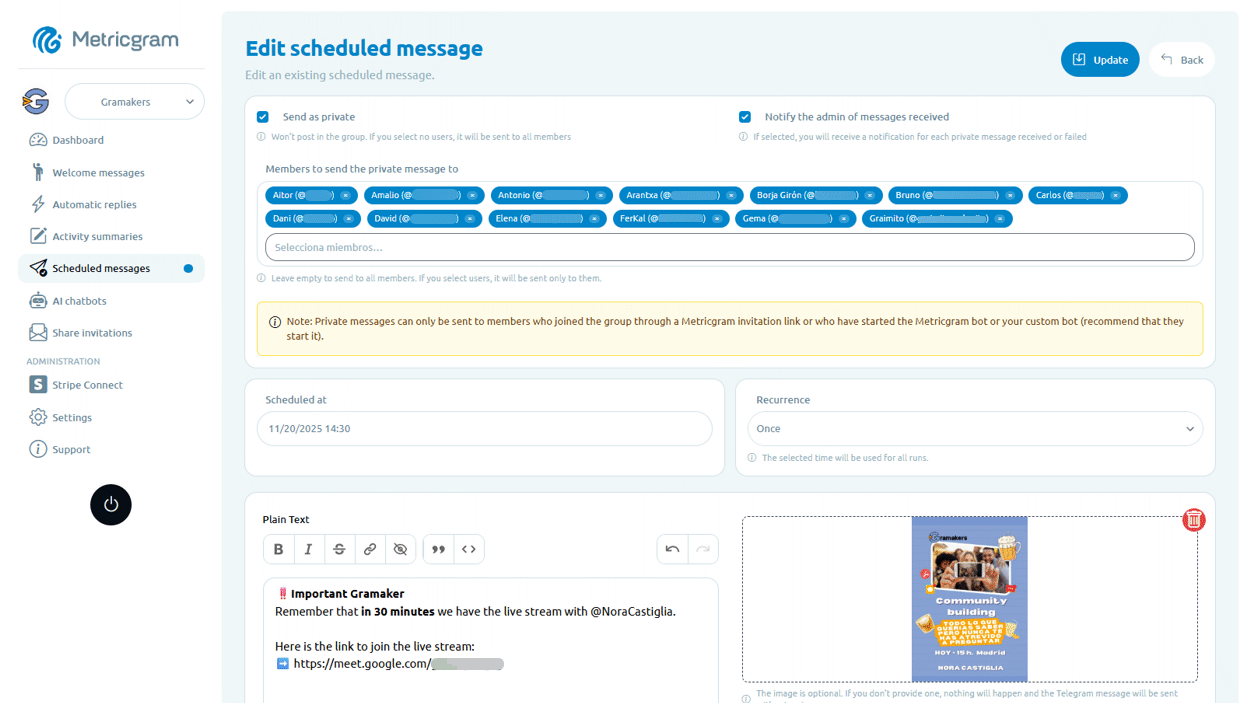
Flexible Scheduling
Schedule messages and polls for any date and time. Set up one-time announcements, community questions, or recurring posts daily, weekly, or monthly.
Rich Content
Send text, images, and formatted messages on schedule. For polls, add descriptions, quiz explanations, and images in answer options when the format needs more context.
Recurring Messages
Set messages to repeat on a schedule — daily tips, weekly reminders, or monthly updates. Automate your content calendar and never miss a post.
Native Telegram Polls
Create regular polls or quizzes with multiple answers, anonymous voting, random options, vote changes, added options, close dates, and hidden results until the poll closes.
Topic Targeting
Send scheduled messages and polls to specific topics within your group. Keep your content organized and relevant by targeting the right audience in the right section.
Message Management
View, edit, or cancel scheduled messages and polls from a central dashboard. See upcoming items at a glance and adjust your content plan as needed.
Frequently Asked Questions
Can I schedule a message or poll to repeat weekly?
What content formats are supported?
Can I schedule polls to specific topics?
What happens if I need to cancel a scheduled item?
Get started in minutes
Plan your communication in advance. Schedule one-time or recurring messages, native polls, and quizzes to keep your community engaged — even when you're offline.
Related Features
Automatic Replies for Telegram
Save time by automatically replying to messages containing specific words or phrases. Answer FAQs, share resources, and guide members without handling every reply yourself.
Activity Summaries for Telegram
Get AI-powered summaries of everything happening in your community. Daily, weekly, or monthly — catch up on what matters without reading every message.
Welcome Messages for Telegram
Make every new member feel at home with automatic, personalized welcome messages sent to the group or privately — no manual effort required.