
Automatic Replies for Telegram
Save time by automatically replying to messages containing specific words or phrases. Answer FAQs, share resources, and guide members without handling every reply yourself.
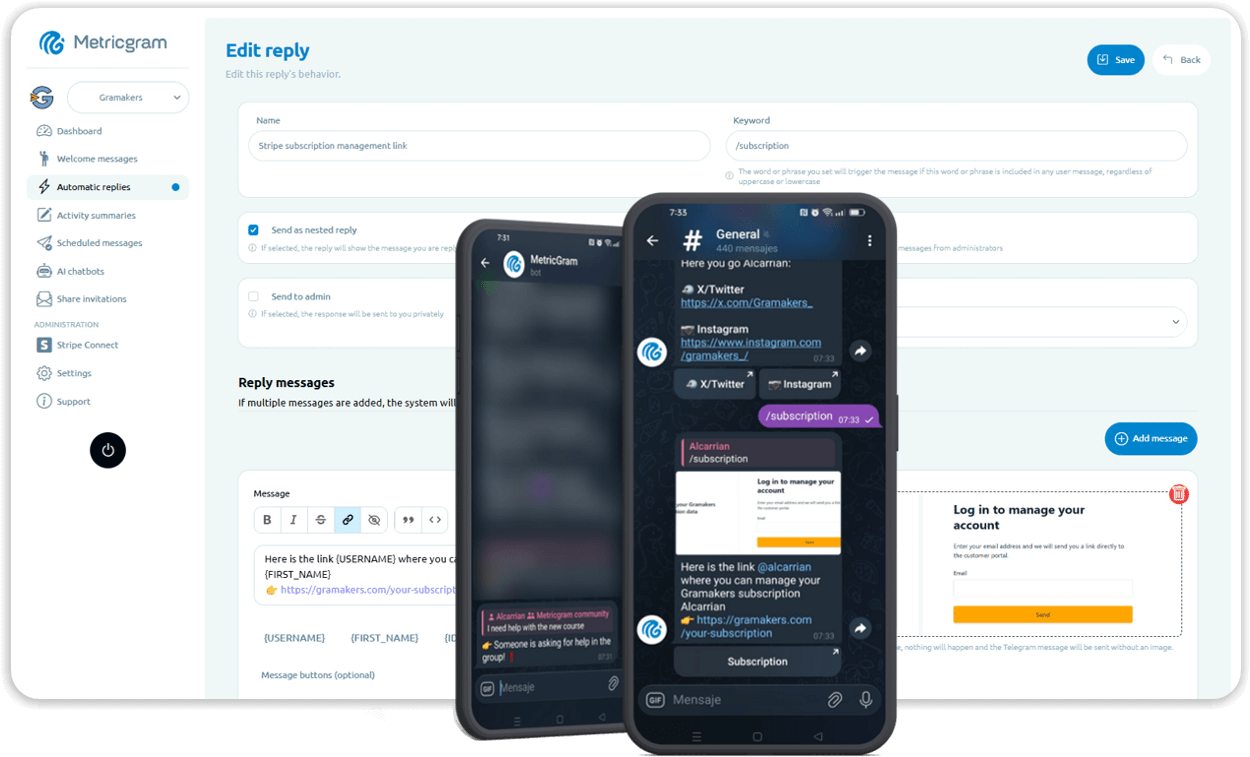
Keyword-Based Auto-Replies
Define keywords or phrases that trigger automatic responses. The system matches keywords anywhere in a message, case-insensitive. Perfect for FAQs and common questions.
Private Auto-Replies
Send automatic replies as private messages to keep your group clean. Great for sharing links, instructions, or sensitive information without cluttering the group chat.
Multiple Response Messages
Add multiple response variations for each automatic reply. The system randomly selects one each time, keeping replies fresh and natural instead of repetitive.
Topic-Aware Replies
Configure automatic replies to respond only in specific topics within your group. Keep different areas of your community organized with relevant automated responses.
Admin Message Filtering
Optionally ignore auto-reply keywords when they appear in admin messages. Prevent accidental auto-replies when you're discussing the reply rules themselves.
Frequently Asked Questions
How does keyword matching work?
Can I have multiple replies for one keyword?
Will the bot reply to admin messages too?
Can automatic replies include images?
Get started in minutes
Save time by automatically replying to messages containing specific words or phrases. Answer FAQs, share resources, and guide members without handling every reply yourself.
Related Features
Welcome Messages for Telegram
Make every new member feel at home with automatic, personalized welcome messages sent to the group or privately — no manual effort required.
AI Chatbots for Telegram
Build intelligent chatbots trained with your own data. Automate support, answer questions, and enrich your members' experience around the clock.
Scheduled Messages and Polls for Telegram
Plan your communication in advance. Schedule one-time or recurring messages, native polls, and quizzes to keep your community engaged — even when you're offline.