
How to Monetize Your Telegram Group with Stripe
A step-by-step guide to turning your Telegram group into a paid community using Stripe Connect. Automate subscriptions, manage access, and start earning from your community.
Live directory
Browse Metricgram's curated Telegram directory to find active communities by category and language, and see how leading groups position their listings.
Open directoryYour Community Has Value. Capture It.
You've built a Telegram group with engaged members. People ask questions, share insights, help each other. The community has real value.
But you're providing it for free. Meanwhile, you're spending hours every week managing it, creating content, moderating discussions, and answering questions. That's work. And work should be compensated.
The good news: Telegram groups are one of the easiest online communities to monetize. Private groups with invite links make access control straightforward, and with the right tools, the entire payment and access flow can be fully automated.
Here's exactly how to do it.
The Business Model
Paid Telegram communities typically use one of these models:
Monthly Subscription
The most common model. Members pay a recurring fee for access to the group. When they stop paying, they lose access.
Best for: Ongoing education, mastermind groups, trading signals, premium support communities.
Typical pricing: $10-100/month depending on the value you provide.
Annual Subscription
Same as monthly but billed yearly at a discount. Higher commitment, better retention, more predictable revenue.
Best for: Established communities where members understand the value.
Tiered Access
Multiple groups or channels at different price points. Free group for general discussion, paid group for premium content.
Best for: Creators who want a free-to-paid pipeline.
Ready to improve your Telegram group? Start your 14-day Metricgram trial.
Start free trialWhy Stripe Connect?
Stripe is the gold standard for online payments. It supports 135+ currencies, handles recurring billing, manages failed payments, and gives you a professional checkout experience.
Stripe Connect specifically is designed for platforms — it lets Metricgram integrate directly with your Stripe account so that:
- You own the customer relationship
- Payments go directly to your Stripe account
- You manage everything from your Stripe dashboard
- Metricgram handles the Telegram access automation
You keep full control of your money and your customers. Metricgram just handles the bridge between "payment received" and "grant Telegram access."
Setting It Up: Step by Step
Step 1: Create Your Stripe Account
If you don't have one, sign up at stripe.com. Enable the products and pricing that match your subscription model.
Create a product in Stripe with:
- A clear name (e.g., "Premium Community Access")
- A price (e.g., $29/month)
- Recurring billing enabled
Step 2: Connect Stripe to Metricgram
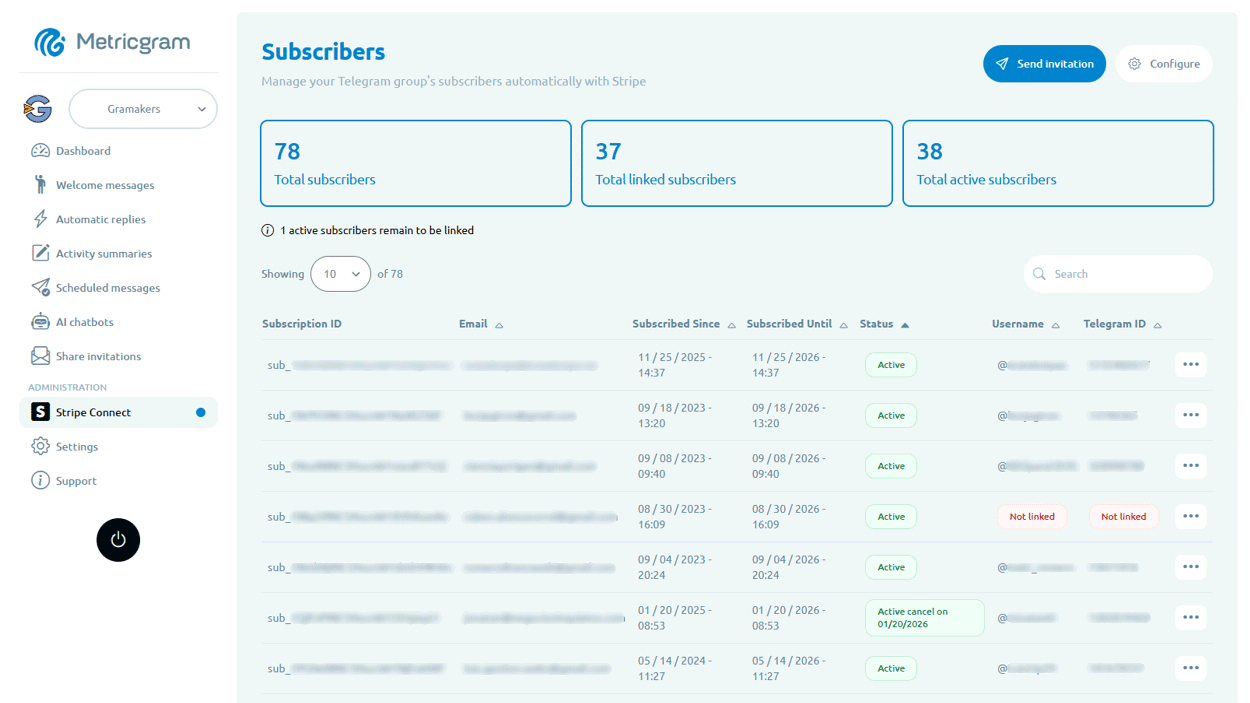
In your Metricgram dashboard, go to the Stripe Connect section. Click connect and authorize Metricgram to read your subscription data.
This is a secure OAuth connection. Metricgram never sees your customers' payment details — it only knows whether someone has an active subscription.
Step 3: Configure Access Rules
Tell Metricgram which Stripe product corresponds to which Telegram group. When someone subscribes to that product, they get access. When the subscription ends, access is revoked.
You can also:
- Choose which Stripe products to sync with each group
- Link specific Stripe customers to specific Telegram users
- Send automatic invitation links to new subscribers
- Set grace periods for failed payments
Step 4: Share Your Checkout Link
Stripe gives you a checkout link for your product. Share this link wherever you promote your community:
- Your website
- Social media bios
- Free Telegram group or channel
- Email newsletters
- Landing pages
When someone completes checkout, the automation kicks in:
- Stripe processes the payment
- Metricgram detects the new subscriber
- The subscriber receives a Telegram invite link
- They join the group
- Metricgram links their Stripe subscription to their Telegram account
All automatic. No manual steps for you.
Step 5: Handling Cancellations
This is where automation really shines. When someone cancels or their payment fails:
- Stripe updates the subscription status
- Metricgram detects the change
- The member is automatically removed from the group
- (Optional) A grace period can be configured for failed payments
No more checking spreadsheets. No more awkward "hey, your subscription expired" messages. No more non-paying members hanging around because you forgot to check.
Pricing Your Community
Pricing is more art than science, but here are guidelines:
Know Your Value
What does your community provide that members can't easily get elsewhere?
- Exclusive content — Tutorials, signals, analysis, insights
- Access to experts — Direct interaction with you or other specialists
- Networking — Connections with like-minded people
- Accountability — Group challenges, check-ins, progress tracking
- Time savings — Curated information instead of searching everywhere
Research Competitors
Look at similar paid communities in your niche. What do they charge? What do they offer? Position yourself relative to the competition.
Start Low, Raise Later
It's easier to raise prices than to lower them. Start with a price that feels almost too cheap, prove the value, then increase for new members. Grandfather existing members at the original price to reward loyalty.
Common Price Points
- $9-19/month — Good for general interest communities
- $29-49/month — Standard for professional communities, trading groups
- $99-199/month — Premium for high-value niches (investing, business coaching)
- $299+/month — Elite groups with direct access to high-profile experts
Growing Your Paid Community
The Free-to-Paid Pipeline
Don't try to sell a paid group to cold traffic. Build a pipeline:
- Free content on social media → followers
- Free Telegram group → engaged community
- Value demonstration → members see what you offer
- Paid group promotion → convert engaged members
The free group acts as your top-of-funnel. Members who experience your free content and want more will naturally convert.
Retention Is Everything
Acquiring a new member costs 5-10x more than keeping an existing one. Focus on:
- Consistent value delivery — Post regularly, share insights, engage
- Community building — Help members connect with each other as well as with you
- Feedback loops — Ask what members want and deliver it
- Exclusive perks — Give paid members things they can't get elsewhere
- Engagement — Use gamification, challenges, and events to keep people active
Key Metrics
Track these numbers monthly:
- Monthly Recurring Revenue (MRR) — Your Stripe dashboard has this
- Churn rate — What percentage of members cancel each month?
- Lifetime Value (LTV) — Average revenue per member over their entire subscription
- Conversion rate — What percentage of free members convert to paid?
Common Mistakes
- No free tier — Going straight to paid without a free community to build trust
- Manual access management — Using spreadsheets or manually checking payments. Automate it.
- Inconsistent value — Charging monthly but only posting when you feel like it
- Pricing too low — If your churn is low, you're probably underpriced
- Ignoring failed payments — These are recoverable revenue. Follow up.
- No onboarding — Paid members need even better onboarding than free ones
Real Numbers
Let's do some quick math:
- 100 paying members × $29/month = $2,900/month
- With 5% monthly churn, you lose 5 members/month
- You need 5+ new members/month just to stay flat
- At 3% churn (good retention), 100 members → $2,900/month → $34,800/year
Now imagine 500 members. Or a $49 price point. The math gets interesting fast.
Get Started Today
The hardest part isn't the technology — it's deciding to charge for your value. The tech is the easy part.
- Create a Stripe account (free)
- Set up your product and pricing
- Connect to Metricgram (free trial)
- Share your checkout link
- Watch the automation handle the rest
You've already done the hard work of building a community. Now let it work for you.
Start your free Metricgram trial — Stripe Connect integration included, no credit card required.
Ready to manage your Telegram group with Metricgram?
Automate tasks, track analytics, and grow your community with a 14-day free trial. No credit card required.
Start free trialGet weekly Telegram community tips
Join community managers who receive our best tips, guides, and product updates.
You may also like
Telegram For Podcasters: How To Build Listener Community, Paid Access, And Launch Momentum Beyond The RSS Feed
Podcasts are great for trust and habit, but weak for direct listener interaction. This guide explains how podcasters can use Telegram for launch rooms, paid communities, and listener retention without confusing it with podcast hosting.
Telegram For Freelancers: How To Use It For Clients, Leads, And Community Without Creating More Admin Work
Telegram can be useful for freelancers, but only if it has a clear job. This guide explains when to use Telegram for client communication, lead nurturing, paid communities, and peer groups without turning it into operational clutter.